Objects in Python
What is an Object?
An object in Python is something that contains information and, sometimes, performs actions. For example, numbers, strings, and tables are all objects of different types.
Storing Objects
In Python, as with all programming languages, it is important to be able to store objects that we create so that we can use them later. The process of storing an object is called assignment, and it entails giving an object a name. For example, the following code creates an object called min_age and stores inside that object the value 21.
>>> min_age = 21
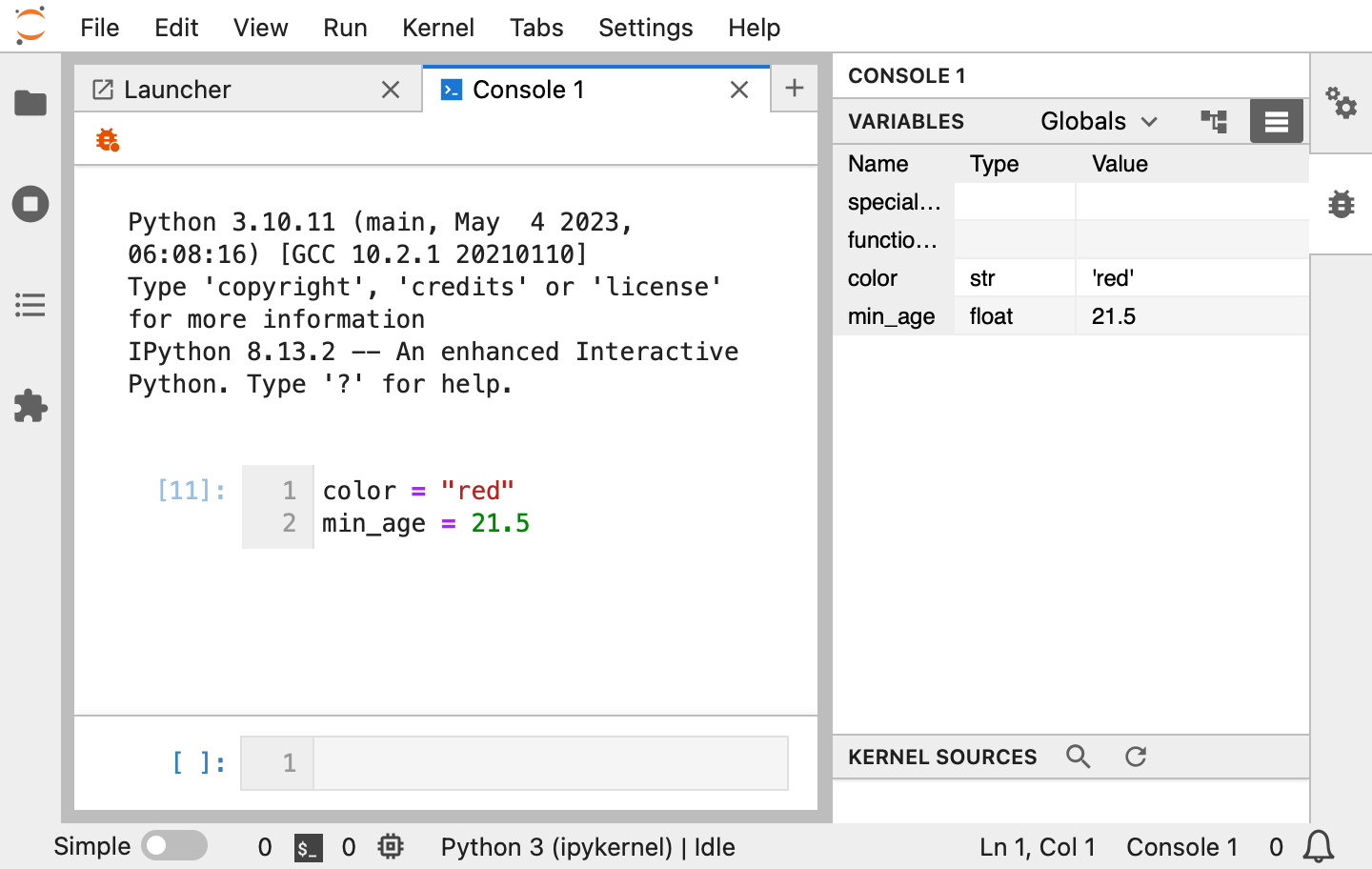
The = operator is called the assignment operator. After you run this code by pressing Shift-Enter, Python will keep track of the min_age variable. You can verify that the variable exists by clicking the 🐞 button on the left of the toolbar, and min_age will appear in the list of variables.
Retrieving Objects
Now if we ask Python to evaluate min_age, it will return the number 21 to us.
>>> min_age
21
Having this minimum age variable stored in an object can be useful later if we have data where we only want to keep individuals who exceed this minimum age.
Object Types
Every object in Python has a type, and you’ll often work with the following types:
Strings, e.g.,
"sharon"or"marcus".Integers (whole numbers), e.g.,
4or7.Floats (decimal numbers), e.g.,
1.2or3.4.Logical which can take only two values
TrueandFalse.Lists, e.g.,
[1, 2, 3].Dictionaries, e.g.,
{"negative number": -1, "positive_number": 2}.
We will describe each of these types in more detail. But first, why are these important anyway?
Why are Types Important?
Let’s discuss an example. Suppose we asked “What is blue divided by 2?” You would rightly tell us that the question doesn’t even make sense, and you can’t answer it.
Suppose instead we asked “What is 4 divided by 2?” You could easily tell us 4 / 2 = 2. In the same way, Python will raise errors if we ask it nonsensical questions or things that it is not built to do.
We therefore need to keep an eye on what data types we have and what we are asking Python to do so they make sense together.
Strings
String objects in Python can be created by surrounding a string in either double quotes or single quotes. The example below shows how to store the above sentence object in an object named my_str. my_str is a string of length 27, i.e., it has 27 individual characters.
>>> my_str = "This is a character object."
>>> len(my_str)
27
Integers
Integers are whole numbers, such as 1, 23, or 1000. 1.2 is not an integer because it contains a fraction of a number. The following creates an integer object called num and stores the value 42.
>>> num = 42
Floats
Floats (short for “floating point objects”) represent real numbers and are created by entering a number that contains a decimal marker .. Thus, while 1.2 is not an integer, it is a real number. Thus 1.2 could be stored as a numeric but not an integer.
>>> num2 = 1.2
As discussed previously, we can also use Python as calculator. In the console, we can enter mathematical expressions without assignment to display the results as a calculator would. The operators for addition, subtraction, multiplication, division, and exponentiation in Python are +, -, *, /, and **, respectively.
>>> 1 + 5
6
>>> 2 - 3
-1
>>> 4 * 2
8
>>> 4 / 5
0.8
>>> 3 ** 2
9
Bools
Bools in Python represent true or false conditions and can be created by typing True or False.
>>> check_condition = True
>>> other_check_condition = False
Lists
Lists are ordered collections of items and can be created by wrapping the items in brackets [] separated by commas. Lists can contain objects of different types. They are often used to store data, such as the ages of people in a dataset.
>>> my_list = [1, "red", 17.5, "hello"]
Lists can be indexed with brackets to retrieve one or more items. Indexing in Python is “zero-based”, i.e., the first element has index 0, the second has index 1, and so on. This may seem counterintuitive at first, but zero-based indexing makes dealing with indices easier in the long run. Indexing with 1 thus returns the second element in the list.
>>> my_list[1]
'red'
You can also use so-called slicing to retrieve multiple elements at once. Slicing indexes the list with two numbers: start:end. This will get all objects in the list between start and end; both numbers are optional. Here are a few examples.
Get all objects after the second element.
>>> my_list[2:]
[17.5, 'hello']
Get all numbers after the first up to and including the third element.
>>> my_list[1:3]
['red', 17.5]
Slicing is inclusive on the left. That means the first element of a slice is the same as if you had indexed with start.
>>> my_list[2:]
[17.5, 'hello']
>>> my_list[2]
17.5
However, slicing is exclusive on the right. That means the last element of a slice is not the same as if you had indexed with end.
>>> my_list[:2]
[1, 'red']
>>> my_list[2]
17.5
This can be confusing but has its benefits. For example, it makes it easy to calculate how many elements the result has. The sliced list my_list[start:end] has end - start elements.
Dictionaries
Dictionaries, just like real-world dictionaries, allow you to look things up. They are created by wrapping key-value pairs in braces {} separated by commas.
>>> definitions = {
...     "Python": "a programming language",
...     "data science": "the study of data to extract insights",
... }
The object to the left of the colon is called the key and the one to the right of the colon the value. Together, they form a key-value pair. Like lists, dictionaries can be indexed by one of its keys.
>>> definitions["Python"]
'a programming language'
Keys must be unique, but the same value may appear multiple times.
Note
Need to include information on categorical data types (such as pandas.Categorical) and pandas data frames, but they are not “builtin” and may deserve a dedicated page in the Python version of the course.
Determining the Type of an Object
We have discussed how to create objects of different types in Python. We haven’t yet described how to determine the type of an object once its been stored. To do so, there are three different strategies we’ll show you.
You can use the function
typeand specify the object in the parentheses.
>>> min_age = 21
>>> type(min_age)
<class 'int'>
>>> min_age = 21.5
>>> type(min_age)
<class 'float'>
>>> color = "red"
>>> type(color)
<class 'str'>
>>> colors = ["red", "blue"]
>>> type(colors)
<class 'list'>
>>> alphabet = {"a": 1, "b": 2}
>>> type(alphabet)
<class 'dict'>
You can use the
printfunction to print the value of the object or simply evaluate the object.
>>> print(color)
red
>>> color
'red'
The second line includes quotation marks which indices that color is a string. Generally, using print gives prettier, more readable results. But evaluating the object directly provides more information.
Lastly, you can always look at the “Variables” panel in the right panel (make sure you’ve activated the inspector by clicking 🐞). This approach doesn’t require you to run any command, but sometimes it won’t have information the other two approaches can tell you.
Summary
In this lesson, we’ve discussed that information can be assigned to objects. We’ve covered the five main types of objects in Python, and we will discuss this in greater detail in later lessons in the course. We’ve discussed how to create each type of object in Python as well as each type’s unique properties. Finally, we discussed how to determine the type of an object in Python using the function type.